Piles of zombie bodies at Cambridge Police Station during Fire Support quest. When the new extra spawns mode was released, there were no...

Piles of zombie bodies at Cambridge Police Station during Fire Support quest.
When the new extra spawns mode was released, there were no limits to how many zombies would spawn. This also applies to other spawn settings like spawn replacements. In areas like Cambridge, where there are a lot of Feral Ghouls in the base game, a spawn replacement setting of 1 to 3 zombies combined with extra spawns and re-spawns from the Fire Support quest can lead to hundreds of zombies in a single area.

Performance Impact

I have a GTX 1050ti and normally get a solid 60fps when playing with the default Ultra graphics setting. To test the limit of zombie spawns I started the Fire Support quests and monitored the zombie count which went over 100 in short order (within a 10000 unit radius of the player). I was getting around 30fps at this point and then manually spawned 200 more zombies right next to Paladin Danse and watched my frames per second plummet to around 8-10fps.

I was able to play through it with Spray 'N Pray but it was quite laggy and I probably would've died if it weren't for using God Mode during my testing.

Area Spawn Limits

To help avoid performance problems, I had added a new spawn limit to the Zombie Walkers holotape. This limits zombies from spawning by checking how many zombies already exist (alive or dead) in the area around the spawn point.

This spawn limit applies to all spawning options including extra spawns, spawn replacements, settlement attacks, etc. and it checked each time. It is possible for an extra spawn point to respawn if the zombies eventually wander out of the area but those zombies would then be counted against the limit in the area they wander into.

This limit is really more of a soft cap in that I did make an exception for spawn replacements. If a spawn replacement is processed, at least one zombie will spawn regardless. Note that the replacement may only spawn one zombie even if the holotape is set to three if the zombie count is at or over the limit in that area.

Dead Zombies Count?

Dead zombies count against the spawn limit as they also chew up resources until they are cleaned up. Sometimes the game is good about doing this automatically as more continue to spawn but sometimes it can take some time.

To address this, I added a new Utility Menu on the holotape to "Remove Dead Zombies" which will disable and mark all dead zombies for delete. Additionally, I add a cleanup timestamp to each zombie at the time they are killed and a quest alias binds them for manual cleanup when the time comes. Currently, the cleanup time is set for roughly 48 in-game hours.

Extra Spawns - Initial Spawn Delay

I made a small change to the extra spawns feature to not spawn when the spawn point is first established. The logic here is that this is the first time the player has ventured into the area where the spawn point resides and there is likely already other creatures nearby anyway.

Now the spawn point will spawn for the first time after waiting the configurable amount of time (eg. 2-5 days).

Increased Spawn Density

Now that I have a spawn limit in place, I felt more comfortable expanding the number of extra spawn points. As such, I added X Markers to the list of potential spawn points since there are a lot of them and they include some random event locations not otherwise covered by Patrol Markers or COC Markers.

Also, I decreased the minimum distance between spawn points from 3000 to 2000. To get this to take effect for save games that have already skipped a bunch of potential spawn points, I migrated to a different keyword. Basically this means previously skipped spawn points are re-checked.

New Featured Mods menu that includes Zombie Walkers Bethesda has released the 1.9 update to Fallout 4 this week that includes a new Fea...

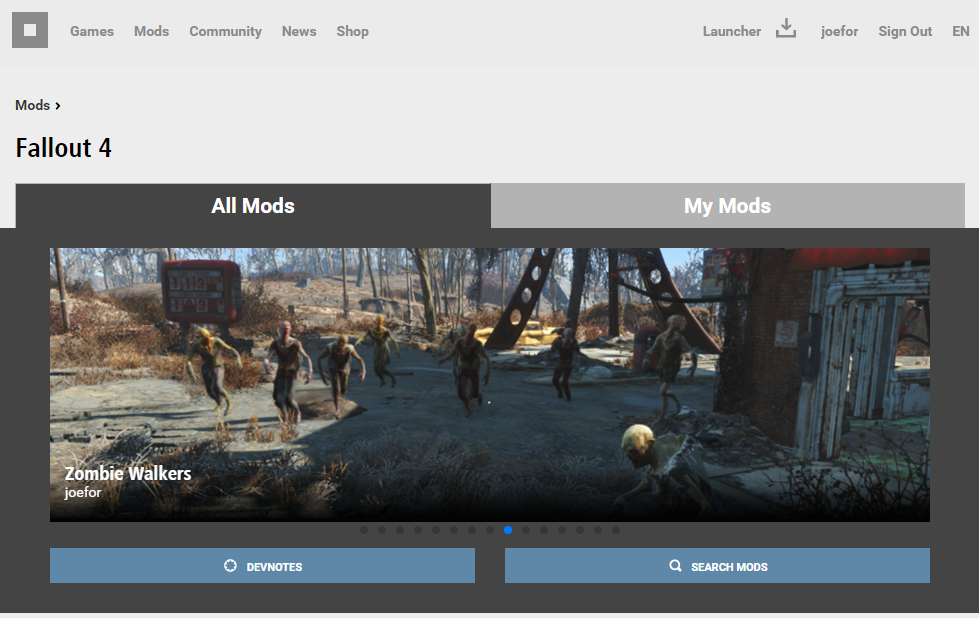
New Featured Mods menu that includes Zombie Walkers
Bethesda has released the 1.9 update to Fallout 4 this week that includes a new Feature mods menu at the top of the screen when viewing mods in game. It is currently out for PC and is expected to roll out to PS4 and Xbox One soon.

The exciting thing for me is that my Zombie Walkers mod was chosen as one of the 12 in the list. There are a lot of mods out there for Fallout 4 and I was a bit late to the game. I'm honored and happy to see that it will get exposure to some potential new players that may not even have known it existed.

This mod continues to be a hobby of mine and I've still got plenty of ideas I'd like to work on. I created a forum on Bethesda's site looking for feedback on some ideas I had for the future. Check it out if you are interested and any feedback is appreciated:

https://bethesda.net/community/topic/24479/relz-zombie-walkers

Zombies spawned from a new spawn point at one of the entrances to Concord. Why add extra spawns? There are many mods out there that sp...

Zombies spawned from a new spawn point at one of the entrances to Concord.

Why add extra spawns?

There are many mods out there that spawn actors in the game and some of them spawn extra Feral Ghouls that work with Zombie Walkers. The trouble is they tend to spawn creatures only in certain areas as is the case with the Zombie Apocalypse mod or spawn so frequently that they create an arcade-like experience.

I wanted a dynamic approach that would spawn not just in cities but also the country-side. Also, I wanted respawns to happen in a way that would flow with playing the game as if zombies wandered into the area in your absence.

Many players have asked for more zombies and while the spawn replacement changes have largely answered this, it still leaves areas of the game world empty once cleared when playing on survival. I wanted the outdoors to continually re-populate over time and keep players looking over their shoulders.

Where to spawn?

The first challenge is determining where to spawn zombies. Here are a few thoughts I had while working on this:

My first thought was to pick a location at a random distance from the player, but this would quickly lead to zombies spawning in places they shouldn't like inside buildings or water. 

I then started thinking about spawning them where creatures have already spawned. The trouble is I was unable to get a reference to the leveled creature markers via script. For a bit I considered spawning my own hidden spawn marker whenever a creature replacement was processed. The trouble with this is that it relied on replacements being enabled and would add extra markers to keep track of (not to mention slightly increasing save game size).

Then I started researching markers that already existed in the game and which ones I could dynamically query for via script. During testing, I spawned vertibird grenades or pre-war shiny cars at these markers so that I can see where they were. There are several types available, but two in particular stood out and were chosen for the first version: 
    1. Patrol Markers - 8,972 in base game
    2. Center on Cell (COC) Markers - 622 in base game
Center on Cell Marker at one of the entrances to Concord.

How to spawn?

In my experiments with spawn locations, I noticed that Patrol markers in particular are sometimes clustered in groups as many as 10-15. I didn't want to have 10-15 separate spawn points for what is essentially one area, so I needed a way to tag just one of them as a spawn point but the others as not. To do this I created two keywords: ZombieSpawn and SkipZombieSpawn.

I already have a script attached to a hidden quest that I use for replacements, so I was able to use that and simply add more aliases to it. The first alias was for "potential zombie spawn points" and the second was for checking if existing "zombie spawn points" should spawn.

The potential spawn markers are filled by any Patrol or COC markers in the load area around the player that have not been processed (has neither of the keywords). For each potential spawn point, I check the area around it for an already existing spawn point (within a certain distance). If there is already a spawn point nearby, then I add the SkipZombieSpawn keyword, otherwise I add the ZombieSpawn keyword which effectively turns that marker into a new zombie spawn point. Note that markers located in settlements, cities, or interior cells are excluded from becoming spawn points.

The existing zombie spawn points are filled by anything in the load area around the player that has the ZombieSpawn keyword. For each spawn point, some processing is done to check if this spawn point should spawn and if so zombies are spawned at that marker's location.

When to spawn?

Determining when to spawn was a little more tricky and may be an area that I revisit with some tweaks as this new feature is play tested. 

The first thing I added was a time constraint. The game has the concept of game days passed which you can get by calling Utility.GetCurrentGameTime(). Each spawn marker has an actor value added to store a timestamp in the future that signifies when this spawn marker is eligible to spawn. Basically I take the current value of game days passed and add to it.
  • Get current game days passed 
  • Add 2 - 10 days to it (configurable via holotape)
  • Make sure time is midnight so zombies spawn at night 
I made the time midnight to avoid mid-day spawns as I'm assuming most players sleep at night. If you happen to be out and about at midnight, you might be in for a few surprises as you wander around. "I thought I just cleared this area?"

Once a spawn point is eligible to spawn, it will start to fill in the zombie spawns quest alias where the timestamp is checked:

Zombie Spawn Point quest alias match conditions.
 The next step is to do a couple extra checks to impose limits on the spawning and hopefully avoid problems:
  • Zombies may not spawn within 3000 units of the player
  • A configurable max zombies threshold is checked before spawning to avoid too many zombies spawning within a given area (currently 10,000 units radius of spawn point)
  • Also, note earlier that spawn points are not allowed to be created in settlements, cities, or interior cells.

Future Plans

In the short term, I'll be interested to hear player feedback on the feature to see if I need to make any changes. There are configuration items for max spawns in an area and the maximum number of days between spawns for a given spawn point. I may expand on these configuration fields moving forward.

Another thought I had has to do with an escalating zombie epidemic. Maybe I could add an optional mode where spawns slowly increase in size and frequency as time passes in the game?

Zombies are attacking Sanctuary! Refactoring is an ongoing effort with Zombie Walkers and this time I have revisited settlement attacks ...

Zombies are attacking Sanctuary!
Refactoring is an ongoing effort with Zombie Walkers and this time I have revisited settlement attacks once again. Settlements are a cool addition to Fallout 4 and lend themselves to the zombie apocalypse play-through as survival havens. As such, I want to make defending them actually matter.

What was wrong?

The first implementation used the game's built-in settlement attack quests. These are unfortunately a bit buggy due to the nature of all the code involved. Also, I feel a bit out of control in that I fire it off and sort of hope it works. I've had more than one user report being notified that an attack was happening and then not seeing any zombies. Others have reported setting settlement attacks to 100% and then never having their settlement attacked. Neither of these are acceptable.

A new approach

The settlement attack quests have a lot of logic involved in determining whether an attack should occur and where. In my mod, I just want to add extra attacks against the settlement you are currently at and the how often is a simple percentage checked hourly. Zombies now attack even if you have 0 food, water, and settlers.

To execute the attack, I use a quest alias to get a settlements LocationEdgeMarkers just like the game's built-in settlement attack quests. For the zombie attacks, I randomly choose one side to attack from only as zombies aren't smart enough to coordinate multiple attack vectors. The number of zombies that spawn is now controllable via a holotape option (from 10 to 30). Note that I've chosen to always spawn a minimum of 10 and the default max is 20.

Once spawned, the zombies are given a reference alias to the settlement's workshop (also bound via quest alias) so they path toward it. This workshop alias is a much simpler way to get a reference to the currently location's workshop than what I was doing which I'm not going to go into here.

I have chosen to retain the "Zombies are attacking ..." message to notify you of the attack but no longer have a message indicating the attack is over. This is due to not keeping track of the attacking zombies which the game built-in quest was doing. I didn't think it was necessary anyway. 

Another side effect of this new approach is what happens if you run away from the attack. In the games built-in quest your settlement structures can become damaged and possibly settlers killed. In this new approach, the zombies will eventually congregate around the workshop if you have no settlers. Having settlers may result in a long battle that the settlers will eventually win unless you have 'Kill Protected' enabled.

More than just zombies

The old implementation actually disabled settlement attacks from anything other than zombies since I was tying into the game's built-in quests and it was the only way to be sure a zombie attack happened when I wanted it to.

Now that I am executing the attack myself, I was able to restore the game's built-in settlement attack functionality so you can be attacked by raiders/super mutants/etc. again. I guess in theory you could be attacked by raiders and zombies at the same time, though it would probably be pretty rare.

A couple things to note though:
  1. the settlement attack holotape options only affects zombie attacks (frequency/max size)
  2. the replacement holotape options may still replace certain settlement attackers

Sanctuary Hills bug

One of the spawn points in Sanctuary was not working properly. It is the one near the main bridge that is actually located up in a tree off the ground (don't ask me why). Whenever this spawn point was chosen either zombies didn't spawn at all or they spawned in the nearby house near the bridge (the one not completely destroyed). To fix this, I moved the spawn point (via script) to the other end of the main Sanctuary bridge where I thought it belonged anyway.

Sanctuary Hills LocationEdgeMarker up in a tree that was moved to the other end of the bridge.

Future ideas

I'm already thinking about possible future enhancements. One thought revolves around putting a real negative consequence to abandoning your settlement during an attack. Maybe all your settlers die, the zombies stick around, and you lose control of the settlement until you clear the zombies and re-activate the workshop?

Level 8 Zombies approach the player in the woods. I initially set out to do some refactoring and re-introduce Fog Ghouls to the commonwe...

Level 8 Zombies approach the player in the woods.
I initially set out to do some refactoring and re-introduce Fog Ghouls to the commonwealth after deprecating the Far Harbor plugin to Zombie Walkers. I ended up reworking the entire zombie leveling scheme hopefully for the better.

The Old Way

The old zombie leveling scheme basically matched the game's built in approach for Feral Ghouls. There are eight (8) main base types of Feral Ghouls each at a different level with different stats. These 8 types are combined in leveled list and the version that spawns is highest level Feral Ghoul that is at or under the player's current level. Below is a table of the main stats I'll be focusing on:

Level XP Damage Resist Energy Resist Base Damage* Health
1 - 8710203035
9 - 141315304570
15 - 212230456080
22 - 3132406070140
32 - 4147507580170
42 - 5161609095200
52 - 617670110105385
62+9085140120505+

*note: Base Damage was increased by 15 over base game and extra radiation damage removed. The value listed is damage done on Normal difficulty (2x = very hard, 4x = survival).

A couple things to note from the above:

  • Health increases greatly at level 52 and again at level 62. After 62, the zombie health can and does continue to grow as the level 62 variant of Feral Ghoul is the only one that levels with the player.
  • Base Damage on survival is lethal. At level 1, zombies do 30 * 4 = 120 damage which is enough to one shot many characters. Survival is the difficulty this mod is meant to be played at, but zombies one shotting players isn't what I am going for either.
  • Between level jumps, the zombie stats remain static. This means a level 8 zombie is identical to a level 3.

The New Way

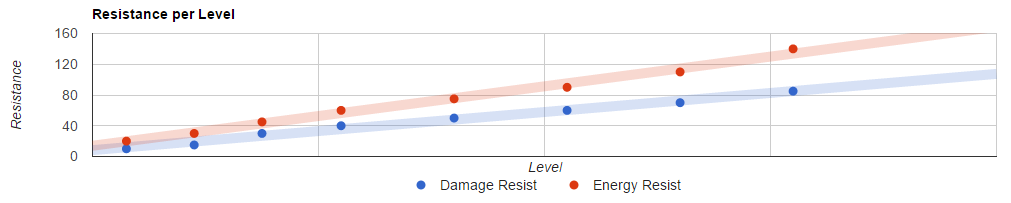
I used the Google Chart API to graph the progression of these statistic changes for Feral Ghouls and noticed that most fit a linear trend. The API allows charts to render trend-lines that provide the formulas which I extracted and used in the OnInit method of the zombie's script to set there stats after they spawn. Here are screenshots of the charts (just in case the API changes, I don't want to have to maintain them here):

XP = 1.432 * Level + 1.063
Damage Resist = 1.24 * Level + 8.276
Energy Resist = 1.933 * Level + 13.988
Damage =  1.433 * Level + 33.175
Health = 5 * Level + 20
A quick note about the Health chart. Notice the two red dots above the trend line toward the right. Feral Ghouls gain more health at levels 52 and 62 than they normally do prior to that. It seems like an attempt by the game creators to just make them a lot tougher for high level characters to face. To create this trendline, I basically used the 35 health at level 3 as a base and extrapolated it out using the game's known health leveling formula. Coincidentally, all of the other Health totals fell in line with this trend.

Survival Damage Adjustment

The new way actually increases damage dealt at level 1 to about 35. On survival this becomes 140! To address this, I added a new holotape option that allows players to adjust the amount of damage done on survival and set the default to match very hard (2x) so that level 1 damage is 70 which should be survivable (at least 1 hit anyway).

To implement this so that it only affects zombies, I actually divide the damage they do by an amount to where when it is multiplied by 4 (survival's damage mult) it comes out to the value I want. For example: diving 35 by 2 gives 17.5, which when multiplied by 4 becomes 70.

Refactoring Spawn Variety

To initially implement spawn variety, I created copies of the 8 actor types for each level increment and manually adjusted their stats at each level. Tedious, painful, and a maintenance nightmare. Not to mention having 8 * 8 = 64 zombie actors increased the size of the mod.

To refactor, I deleted all the extras and stuck with the base 8 types. All of their stats are set via a script attached to them when they spawn now, so I no longer have to worry about manually setting their stats via the GUI. 

I also went through and added all available skin tones for Feral Ghouls in the base game to all variations (Traits -> Object Template on the Actor in CK) and added the special Pink zombies from Suffolk County Charter School for fun.

  4 different base outfits (default, bloody, withered, armored)
* 7 different base skins (Carrion, Charr, Dark, Green, Grey, Pale, Pink)
= 28 base combinations
+ 1 special Suffolk Country Charter School skin/outfit
+ 1 Fog Ghoul skin/outfit (if Far Harbor installed, see below)
= 30 total combinations

Fog Ghouls Zombies

Finally, I added the necessary code to add the Fog Zombies to the commonwealth if you have Far Harbor installed. Originally, I was just going to add the outfit to the list above, but I thought it would be funner and maybe more appropriate to use these zombies to replace marine creatures (if spawn replacements are used). In this way, when you enter an area that would spawn things like Mirelurks, which are normally near water, you would start to see the fishing net covered Fog Zombies.

Here's the list of creature types replaced by Fog Zombies (if replacements are enabled):
  • Creatures
    • Anglers
    • Gulpers
    • Mirelurks
  • Heavy Knockers
    • Fog Crawlers
    • Hermit Crabs

Zombie Walkers 2.0

The above was released as part of the Zombie Walkers 2.0 release. Since the leveling changes and refactoring was quite large and affected the core of the mod, I decided to finally up the major version number. I'm hoping to stick with a more canonical versioning scheme moving forward.

Other changes included in this release was a fix for immortal zombies caused by explosive damage and a reset of the Far Harbor leveled lists to help those migrating away from that deprecated mod.

A Zombie Horde approaches! In almost every tradition zombie film the zombies tend to horde together in groups and wander around. This is...

A Zombie Horde approaches!
In almost every tradition zombie film the zombies tend to horde together in groups and wander around. This is something I've always wanted to bring to my mod and I've finally gotten around to implementing it.

AI Packages

Packages are sets of instructions that influence the behavior of actors in the game. You can think of them as configurable AI that gives actors (like zombies) a list of possible actions to perform.

Many actors in the game, including Feral Ghouls, have default packages assigned. One in particular has a lot of useful functionality already called the Default Master Package which I'll talk about below.

Linked References

Step one is figuring out how to make them move. It really isn't a horde if the zombies just stand around. What I wanted to accomplish was zombies that walk around aimlessly if they are idle (not in combat).

This is where the aforementioned packages come in. The Default Master Package has procedures for Follow and Patrol. Both of these procedures work by making the actor path to a linked reference. A linked reference can be just about anything and there are methods in Papyrus to GetLinkedRef and SetLinkedRef.

Patrol (aka. make them wander)

The patrol package is triggered if a zombie has a linked ref set to something like an Idle_Marker. Idle Markers are hidden objects that mark a particular location or object. They can be explicitly assigned as a linked reference to an actor or idle actors can "discover" them on their own if they happen to be in the area (like settlement workshops).

In my case, I spawn an Idle Marker in a random direction away from a zombie I want to make walk and then assign the marker as the zombie's linked reference. This is enough to make the zombie slowly walk (regardless of the Speed setting on the holotape).

Once they get to the marker, they stand around. Of course I want them to continue wandering aimlessly until they bump into something (ie. enter combat). To do this, I use the RegisterForDistanceLessThanEvent between the zombie and the Idle Marker. This event triggers when the zombie gets within a certain radius I define of the marker. When it triggers, I simply move the marker. This pattern repeats and the zombie continues to follow the continuously moving marker.

The direction they move is random at first and then they generally stay in the same general direction afterward. I assigned a number to the basic cardinal directions and used an Actor Value assigned to the marker to keep track of the direction. The first move is completely random, then the subsequent moves can be straight ahead (no change) or 1 value deviation from the last direction.

7 (NW)0 (N)1 (NE)
6 (W)2 (E)
5 (SW)4 (S)3 (SE)

Dealing With Patrol Problems

Unfortunately, there are times when a zombie is unable to reach the Idle Marker or at least get close enough to trigger the DistanceLessThan event. In those cases, the zombie will just stand around and stop moving so we need to do something about it.

I created another Actor Value for timestamp and assigned it to the marker to keep track of the last modified time. This timestamp is set when the marker is created and any time it is moved.

I already have a hidden quest with a trigger to do some processing every 10 seconds or so. I updated this function to add a check for all markers (of a type that I spawned). If a marker's timestamp is older than some threshold I define then the marker is deleted and I send a Custom Event.

All zombies that are spawned listen for my custom ZombieMarkerDeleted event that is generated by my quest's script and respond to it. In the case of a zombie that is wandering, it begins the wandering process all over again by spawning a brand new marker in a random direction.

From Wandering Zombies to a Horde

OK, so at this point we have every zombie wandering in it's own direction randomly. To make it a horde they really need to band together some how and move in groups.

To accomplish this, I took advantage of the Follow procedure which works similar to the Patrol above. If you set a linked reference for a zombie to another zombie then it will follow it. It's really that simple.

But wait, who should follow who? I came up with a simple solution to allow the zombies to determine whether to follow or start patrolling themselves. The zombie effect script that gets attached to them (see Dynamic Script Attachment) now sets their FeralGhoulFaction rank randomly from 0 to 100 and that rank is used to determine who follows who.

  • Check for nearby zombies and follow the first one you come across with a higher rank than my own.
  • If no zombies are nearby with a higher rank, then start to patrol (wander by spawning an Idle Marker to path to). 
  • Note that any zombies that have decided to follow me will therefor also start to patrol behind me.

Dealing With Follow Problems

The only real problem you run into when following another zombie is what to do if that zombie dies. The easy solution for this is to register for the OnDying event and follow someone else (or start to patrol ourselves).

Issues With Quests

After release, a bug was reported where a player was sent to clear zombies from an area but when they got there the zombies were nowhere to be found. As you might have guessed, the horde behavior caused them to wander out of the area before the player got there.

To address this and avoid interrupting quests, I decided to disable the horde behavior for certain zombies so that they would be there when expected. To determine which zombies to not move, I ended up discovering by some research that many of the quest related actors in the game are linked to their location with a Location Ref Type. There types allow quests to quickly determine if all actors in a group are still alive (eg. functions like GetRefTypeAliveCount). You can check if any actor is used as a Location Ref Type pretty easily using GetLocRefTypes.

Another exclusion I ended up adding is for zombies that spawn in a Clearable or Dungeon location. These locations often rely on the actors being present to be "cleared" and can easily be checked by GetCurrentLocation and HasKeyword.
  • do NOT follow or patrol if:
    • Actor (or replacement) has a least one linked Location Ref Type
    • Actor (or replacement) spawned in a Clearable or Dungeon location.
The "or replacement" refers to the optional Spawn Replacements holotape settings. If used, the replacement is taken into account in determining mobility. Note that if replacement levels larger than one for one (eg. two for one) are used, then the "extra" zombies are not tied to the original actor in any way and can and will wander freely.

Wrap Up

The combination of patrolling and following described in this article gives zombies an initial wandering horde behavior that is much preferred over just standing around. It adds a dynamic unpredictability to every play-through as well in that you'll never know where zombies might appear even if you've memorized all the spawn points.

I'll likely continue tweaking this behavior as bugs are reported and ideas come to me. I already have thoughts about adding additional marker types for noise and possible dead bodies. Noise markers could serve to attract zombies from farther away than the game's default detection range (but not make them hostile, just make them lumber toward the sounds in the distance). Dead bodies could attract nearby zombies for a feast as Idle Markers can have Idle Animations associated with them (eg. the Feral Ghoul crouching and eating animations).